
Best iPhone Location Changer: What to Look For Before You Pay
The best iPhone location changer is the one that sets a fake GPS location without a jailbreak, puts your real GPS back in one click, and costs a fair price. Everything else, like routes and a joystick, depends on what you want to do.
This guide gives you a short checklist. Use it to judge any GPS location changer, including ours. We make Telepin, so we also tell you plainly where it falls short.
What an iPhone location changer does
An iPhone location changer is a desktop app that tells your iPhone to report a different GPS location. You pick a place on a map, or type GPS coordinates, and the iPhone uses that spot as its current location. Apps that read GPS, like Maps, then see the new place.
The iPhone has no built-in way to do this. In Settings > Privacy & Security > Location Services you can turn location on or off for each app. That is a privacy control, not a way to change your location. It cannot set a fake place.
Does a VPN change your GPS location?
No. A VPN changes your IP address, which is the country that websites see. It does not change the iPhone's GPS. Maps, Find My and games still see your real physical location. If you want to change the location on iPhone that GPS apps read, you need a GPS spoofing app on a computer.
Changing your App Store country is also different. You do it in Settings > [your name] > Media & Purchases > View Account > Country/Region. It changes the store linked to your Apple ID, not your GPS.
The checklist: 7 things to look for
1. No jailbreak
A good iPhone location changer works on a normal iPhone. You should not need to jailbreak, and you should not need to install an app on the iPhone itself. Look for a tool that only asks for Developer Mode, which Apple builds into iOS. You turn it on in Settings > Privacy & Security > Developer Mode, and you can turn it off again later.
2. Support for the latest iOS
Check which iOS versions the tool supports before you pay. Telepin needs iOS 17.4 or later, so iOS 18 is inside its range.
3. A one-click way to restore real GPS
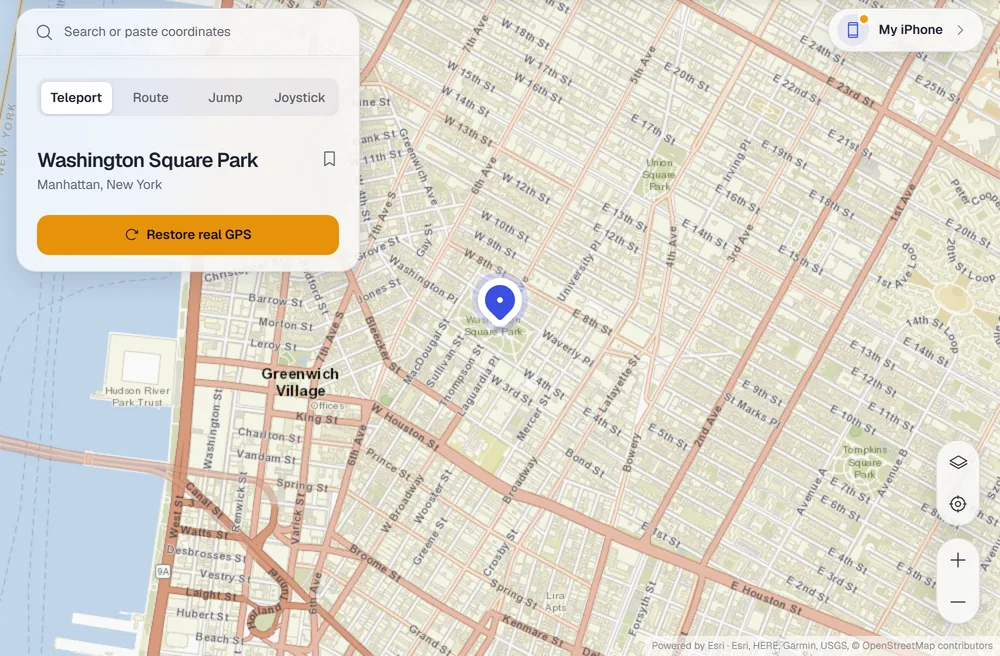
This is the feature people forget, and it matters most. When you are done, you want your real GPS back at once. Look for a clear button that does it. If a tool hides this step, you can end up stuck at a fake place.
4. Movement modes: teleport, route, joystick
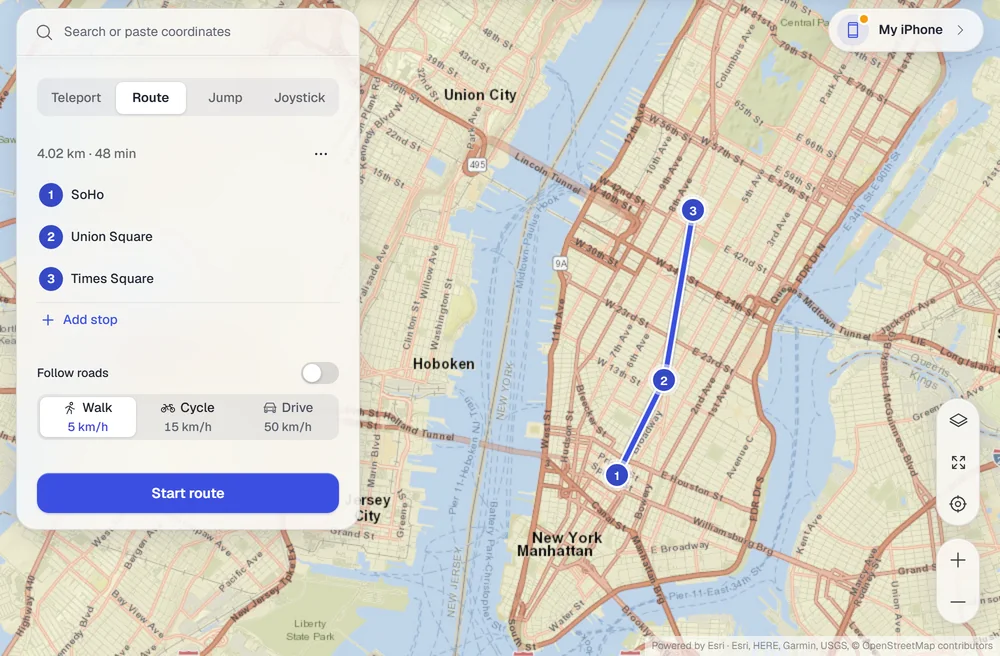
Teleport moves you to one spot. Route mode moves you along a path at a set speed, which looks more like real travel. A joystick lets you steer by hand. If you only want to check how an app looks in another city, teleport is enough. If you want to move, you need route and joystick modes.
5. GPX import and export
GPX is a common file format for routes. With GPX import you can load a route you made in another tool. With export you can save a route and share it or use it again. It also helps if the app lets you save locations and favorite places, so you do not search for them every time.
6. Wi-Fi after the first connection
Most desktop tools need a USB cable the first time. After that, a Wi-Fi connection is much easier, because the phone does not have to sit next to the PC. Check that the tool supports it on your local network.
7. A fair price and clear subscription terms
Most iPhone location changers are paid apps with a monthly subscription. Read the price page before you pay. Check what one month costs, whether the price renews at a different rate, and how many devices one license covers.
Price table: Telepin vs iAnyGo
Here is a direct price comparison with Tenorshare iAnyGo, the best-known rival. The iAnyGo price is the 1 Month License for Windows, as listed on tenorshare.com on November 8, 2026.
| Telepin | Tenorshare iAnyGo | |
|---|---|---|
| Monthly price | $5.99 a month | $12.95 a month (1 PC, 1 to 5 devices) |
| Computer | Windows 10 or 11 (64-bit) | Windows and Mac |
| Phone apps | None, desktop only | iOS and Android apps |
Telepin saves you $6.96 a month, or $83.52 a year, against the iAnyGo 1 Month License. iAnyGo also has quarter, year and lifetime plans and a 1-hour free trial, and it runs on more systems. Pick the one that fits your computer and budget. For a closer look, read our iAnyGo alternative page.
Other paid tools you may see
Other paid desktop location changers include iMyFone AnyTo, iToolab AnyGo, Wondershare Dr.Fone Virtual Location, LocaChange and MocPOGO. Check each one against the checklist above before you buy.
How Telepin scores on the checklist
Telepin is a Windows app that sets the GPS location of an iPhone connected to your PC. It costs $5.99 a month.
- No jailbreak: yes. Nothing is installed on the iPhone. You need Developer Mode, a USB cable for the first connection, and Apple's free Apple Devices app on the PC.
- iOS support: iOS 17.4 or later.
- Restore real GPS: one click. If the cable dropped, reconnect and use Reconnect & restore. If that fails, restart the iPhone and it clears.
- Teleport: click the map, search an address or type coordinates, then press Set iPhone location.
- Route: two or more stops, straight lines or follow roads for walking, cycling or driving. Set the speed (up to 120 km/h) and the number of passes.
- Jump: visits stops at a set interval.
- Joystick: steer with the on-screen pad or the arrow or WASD keys. Keyboard control can help with accessibility if a mouse is hard to use.
- GPX: import and export.
- Wi-Fi: yes, on the same local network after the first USB connection.
- Privacy: saved places, recent places and routes stay on your PC.
Telepin's honest limits
Telepin is not the right pick for everyone yet. Please read these before you download it:
- Windows only. There is no Mac app yet. Apple Silicon Mac users can build it from source, but that is untested.
- Early access. It is version 0.5.0.
- Unsigned installer. Windows may warn you about an unknown publisher.
- Not yet tested on a real iPhone. So far it has been tested on a simulated iPhone only.
- Some apps can detect it. Some apps can detect or refuse a simulated location.
If these limits are fine for you, see the setup steps or go to the download page.
Is an iPhone location changer safe to use?
The tool itself does not install anything on your iPhone, and you can switch Developer Mode off afterwards. The bigger risk is the app you use it with. Some apps can still detect a fake GPS location, and some ban it in their rules.
Pokémon GO is the clear case. Niantic's Terms of Service forbid location spoofing. Accounts that spoof can get warnings, temporary suspensions or a permanent ban. No tool can promise that your account is safe. Read more in our Pokémon GO spoofing guide.
Never use a location changer to mislead family, a partner, an employer or the police, for example with Find My or when you share location. That is not what these tools are for.
FAQ
Can I change my location without jailbreaking?
Yes. A desktop iPhone location changer like Telepin uses Developer Mode, which is part of iOS. You do not need to jailbreak or install an app on the iPhone. See how to change location on iPhone for every option.
Does a VPN change GPS location on iPhone?
No. A VPN only changes your IP address. Your GPS, and so Maps, Find My and games, still show your real place. To spoof your GPS you need a GPS location changer.
Is an iPhone location changer free?
The desktop tools in this guide are paid. Telepin costs $5.99 a month. Tenorshare iAnyGo lists $12.95 a month for its 1 Month License and offers a 1-hour free trial.
Why is my iPhone location changer not working?
Check that Developer Mode is on, the iPhone runs iOS 17.4 or later for Telepin, and the Apple Devices app is installed on the PC. Use a USB cable for the first connection. Also, some apps can detect or refuse a simulated location. Our FAQ has more fixes.
Which iPhone location changer is best?
Use the checklist above: no jailbreak, latest iOS support, one-click restore, the modes you need, GPX, Wi-Fi and a fair price. If you use Windows and want the lowest monthly price, try Telepin. If you need a Mac app or a free trial, look at iAnyGo or another tool.