
How to Change Location on iPhone: Every Real Way
There are three real ways to change location on iPhone. Each one changes a different thing:
- Settings controls which apps can see your location, and which App Store country or region you use. It cannot set a fake location.
- A VPN changes your IP address, so websites think you are in a different country. It does not change your GPS location.
- A desktop location changer sets the GPS location of your iPhone from a computer. This is the only way to change the place that Maps and other apps see.
So the right way to change your location depends on what you want to change. This guide explains each option, step by step, and what it can and cannot do.
What "location" means on an iPhone
Your iPhone has more than one location. Apps and websites read different ones:
| What changes | What it affects | How to change it |
|---|---|---|
| GPS location | Maps, Find My, games, weather, check-ins | A location changer on a computer |
| IP address | Websites and streaming services | A VPN |
| App Store country or region | Which apps and prices you see | Settings |
| Location Services | Which apps may read your location | Settings |
If you only want to change your country in the App Store, Settings is enough. If you want apps to see a different place on the map, you need a tool that changes the GPS location on iPhone.
Change location settings on iPhone with Location Services
Location Services decides which apps can use your current location. You cannot use it to pick a different location, but you can turn location off for some apps or all of them.
- Open the Settings app.
- Tap Privacy & Security, then Location Services.
- Turn location on or off for each app.
This is the way to hide your location on an iPhone from certain apps. It does not spoof your location. The app simply gets no location.
Change your country or region on iPhone (App Store)
You can change your App Store country or region in Settings. This changes the store region tied to your Apple ID. It does not change the GPS location on your iPhone.
- Open Settings and tap your name at the top.
- Tap Media & Purchases, then View Account.
- Tap Country/Region and follow the steps.
Use this if you moved to a different country and want the local App Store. Changing your region on iPhone this way will not move you on the map. Maps, Find My and games still see your actual location.
Change your iPhone location with a VPN
A VPN changes your IP address. Websites then think you are in the country of the VPN server. People use a VPN to access content that is only shown in a different country.
To use one, install a VPN iPhone app from the App Store, open it, and pick a server country.
What a VPN cannot do: it does not change your GPS location. Your iPhone still reports its real place from GPS. So Maps, Find My, weather apps and location-based games still see where you really are. If you want to change the location on iPhone for those apps, a VPN is the wrong tool.
How to change GPS location on iPhone with a location changer
To change your GPS location, you need software to change the location from a computer. You connect your iPhone to the computer, pick a place on a map, and the computer sets that place as the iPhone's location. This works without a jailbreak.
Several paid desktop tools do this, such as Tenorshare iAnyGo, iMyFone AnyTo, iToolab AnyGo, Wondershare Dr.Fone Virtual Location and LocaChange. We make Telepin, a location changer tool for Windows. Here is how to change location on iPhone with it.
What you need
- A Windows 10 or 11 PC (64-bit). There is no Mac app yet.
- An iPhone on iOS 17.4 or later.
- A USB cable for the first connection.
- Apple's free Apple Devices app on the PC.
- Developer Mode turned on in iOS.
Telepin costs $5.99 a month. Nothing is installed on the iPhone, and there is no jailbreak. Full steps are on the setup page.
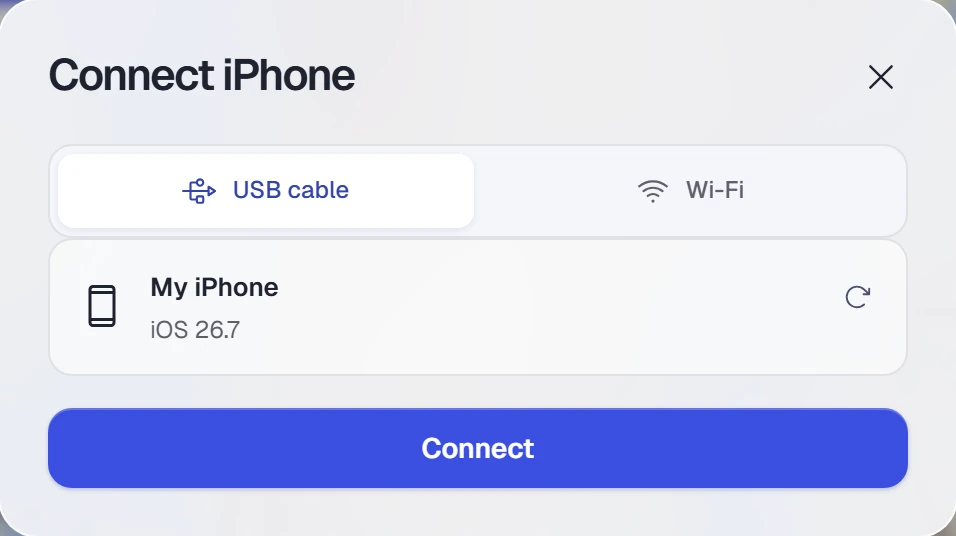
Step 1: Connect your iPhone to the computer by USB
Connect the iPhone to the computer with a USB cable. Open Telepin. After this first USB connection, Telepin can also connect over Wi-Fi on the same local network.
Step 2: Turn on Developer Mode
On the iPhone, go to Settings > Privacy & Security > Developer Mode and turn it on. You can turn Developer Mode off again later.
Step 3: Click the map and press Set iPhone location
Click anywhere on the map, search an address, or type coordinates. Then press Set iPhone location. Apps on the iPhone now see the location you want.
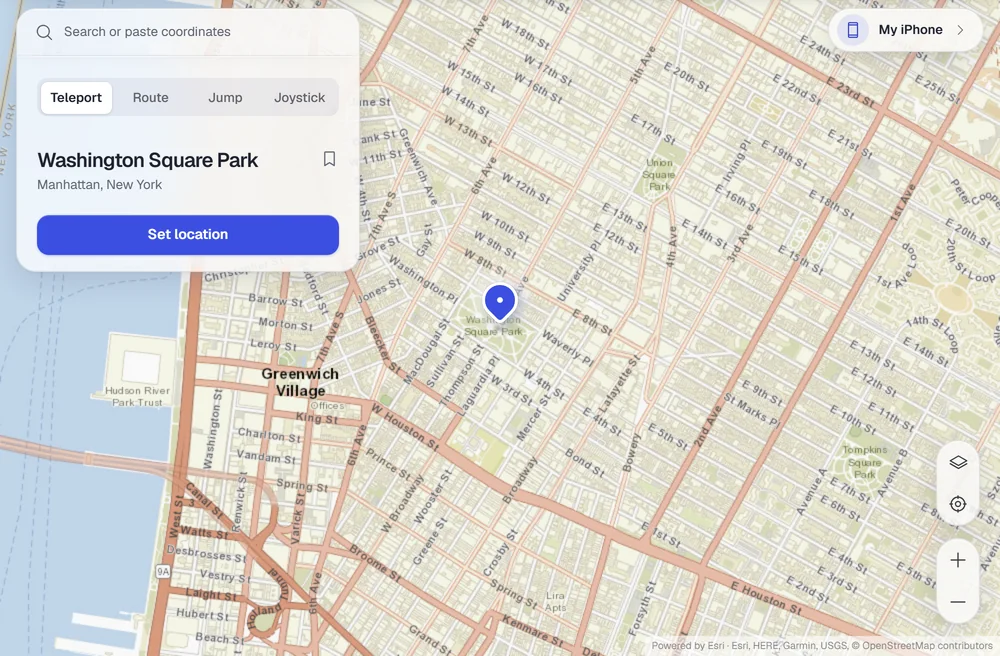
Telepin has other modes too. Route mode moves along two or more stops at a set speed. Jump visits stops at a set interval. Joystick lets you steer with the arrow keys. Read more in our guide to fake GPS on iPhone.
Step 4: Restore real GPS
When you are done, press Restore real GPS. Your iPhone goes back to its actual location in one click. If the cable dropped, reconnect and use Reconnect & restore. If that fails, restart the iPhone.
Honest limits
Telepin is early access. The Windows installer is unsigned, so Windows may warn about an unknown publisher. So far it has been tested on a simulated iPhone, not yet on a real one. Some apps can detect or refuse a simulated location.
Can you change the location on Find My iPhone?
No, not in Settings. Find My iPhone shows the phone's GPS location. There is no setting to change your location on Find My to a different place. Changing your Apple ID region or using a VPN does not change it either.
Do not use any tool to fake a location to family, a partner, an employer or the police. Telepin is not for that.
Changing location in games
Some people spoof their location to play location games. Pokémon GO is the most common. Niantic's Terms of Service forbid location spoofing. Accounts that spoof can get warnings, temporary suspensions or a permanent ban. No tool can promise your account is safe. Read more in our Pokémon GO spoofing guide.
Which way to change your location should you use?
- To hide your location from certain apps: Location Services.
- To change your country in the App Store: Country/Region in Settings.
- To access content from a different country on websites: a VPN.
- To change the GPS location on iPhone for apps and maps: a desktop location changer.
To compare tools, see the best iPhone location changer, our iAnyGo alternative page, and our guide on how to spoof location on iPhone.
FAQ
Can you change location on iPhone without a computer?
You can change your App Store region and your VPN country without a computer. To change the GPS location on an iPhone without a jailbreak, you need a computer and a location changer.
Do I need to jailbreak my iPhone to change its location?
No. A desktop tool like Telepin uses Developer Mode instead. Nothing is installed on the iPhone.
How do I change my phone location to another country?
For websites, use a VPN and pick a server in that country. For the App Store, change Country/Region in Settings. For maps and apps, set a GPS location in that country with a location changer.
Why does my phone think I'm in another state?
If a VPN is on, websites see the country of the VPN server, not your real place. Turn the VPN off. Apps that use GPS, like Maps, still see your actual location.
How can I change my Apple region?
Go to Settings > your name > Media & Purchases > View Account > Country/Region.
More answers are on our FAQ page.